Canada Museum of History
Large Scale Software Delivery
HOME
ROLETechnical Lead / Lead Engineer
DATEMay 2017 Launch
Executive Summary
As Technical Lead on the Canadian History Hall project at the Canadian Museum of History, I developed a large suite of interactive kiosks and supporting systems spanning dozens of stations across a two-floor national-scale exhibition.
This project occurred during a major industry transition away from Adobe Flash. To ensure long-term maintainability and enable rapid production across a large exhibit footprint, I built a reusable kiosk framework based on Chromium kiosk mode and JavaScript—establishing a standardized architecture for configuration, asset loading, UI layout, idle/attract behavior, multilingual support, and touch interaction.
Using this framework, I produced and delivered 22 interactive applications (plus an ADA companion app), ranging from artifact viewers and document readers to timelines, audio listening stations, and multi-screen installations with kiosk-to-display control.
This project became the foundation for a JavaScript-based kiosk platform later adopted by other developers at Unified Field for future museum deployments.
This project occurred during a major industry transition away from Adobe Flash. To ensure long-term maintainability and enable rapid production across a large exhibit footprint, I built a reusable kiosk framework based on Chromium kiosk mode and JavaScript—establishing a standardized architecture for configuration, asset loading, UI layout, idle/attract behavior, multilingual support, and touch interaction.
Using this framework, I produced and delivered 22 interactive applications (plus an ADA companion app), ranging from artifact viewers and document readers to timelines, audio listening stations, and multi-screen installations with kiosk-to-display control.
This project became the foundation for a JavaScript-based kiosk platform later adopted by other developers at Unified Field for future museum deployments.
Exhibit Context
The Canadian History Hall is the Canadian Museum of History’s flagship permanent gallery, covering over 15,000 years of Canadian history and featuring more than 1,500 artifacts across two floors.
Unified Field (subcontracted under Northern Light Productions) was responsible for a wide range of interactive programs throughout the hall, including artifact exploration kiosks, media-driven interactives, and touchscreen experiences designed to complement physical displays.
Unified Field (subcontracted under Northern Light Productions) was responsible for a wide range of interactive programs throughout the hall, including artifact exploration kiosks, media-driven interactives, and touchscreen experiences designed to complement physical displays.
System Architecture Overview
Standardized Kiosk Deployment Stack
- Windows-based kiosk deployments
- Chromium running in kiosk mode launched via batch script
- Local file-based HTML/JavaScript applications
- Centralized settings.json and assets.json configuration patterns
- Modular JS include system (pre-ES6), allowing app components to be reused across multiple interactives
- Shared Framework Capabilities
- stage scaling / resolution adaptation
- UI display object wrapper system (Node-style element abstraction)
- event dispatch system (ActionScript-style patterns)
- idle + timeout handling (Still There / Attract behavior)
- touch interaction utilities (scrolling, pinch-to-zoom, inertia)
- multilingual runtime language switching with RTL/LTR support
- standardized asset loading (images/fonts/data)
Key Interactive Experiences Delivered
The applications built for the hall included:
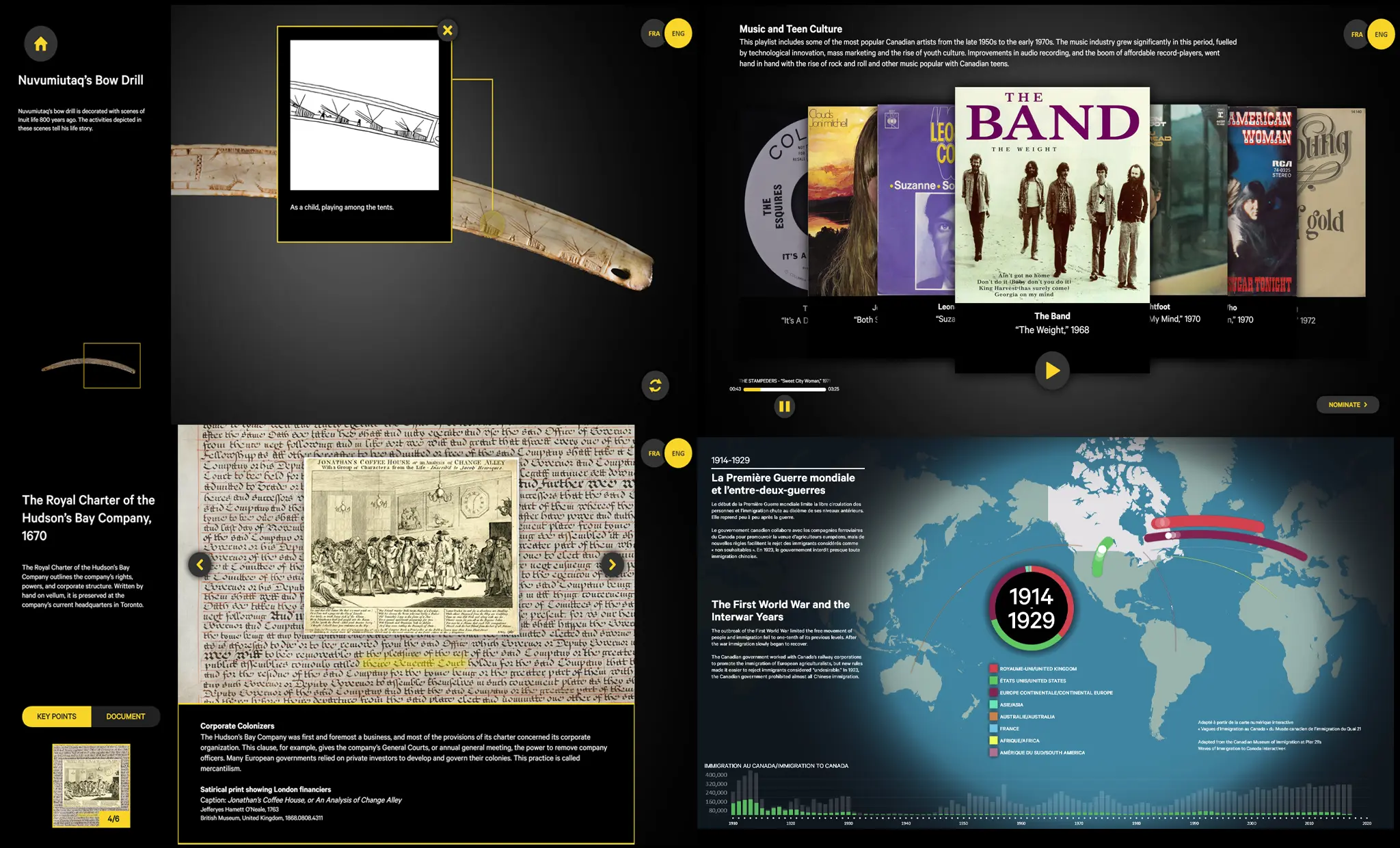
Artifact Viewers
A standardized artifact browsing system designed to mirror the layout of physical exhibit cases, allowing visitors to:
- browse artifact collections via scrollable menus
- view detailed descriptions
- explore high-resolution imagery
- interact with hotspot callouts on specific artifact regions
Document Readers
A document exploration experience supporting:
- zoomable scans of historical documents
- highlighted points of interest
- consistent reusable viewer UI used across multiple stations
Timeline Interactive
A time-navigation system with:
- zoomable horizontal timeline navigation
- highlighted historical events
- supporting imagery and contextual content panels
Audio Listening Stations
Touchscreen “jukebox” style audio players with cover-flow style browsing and playback UI.
BrightSign Kiosk-to-Display Systems
Developed BrightSign-based installations where:
- a touchscreen kiosk acted as the control UI
- a nearby display acted as the synchronized playback screen
- kiosk and display communicated via UDP messaging
- both devices ran browser-based applications built from the same JS framework
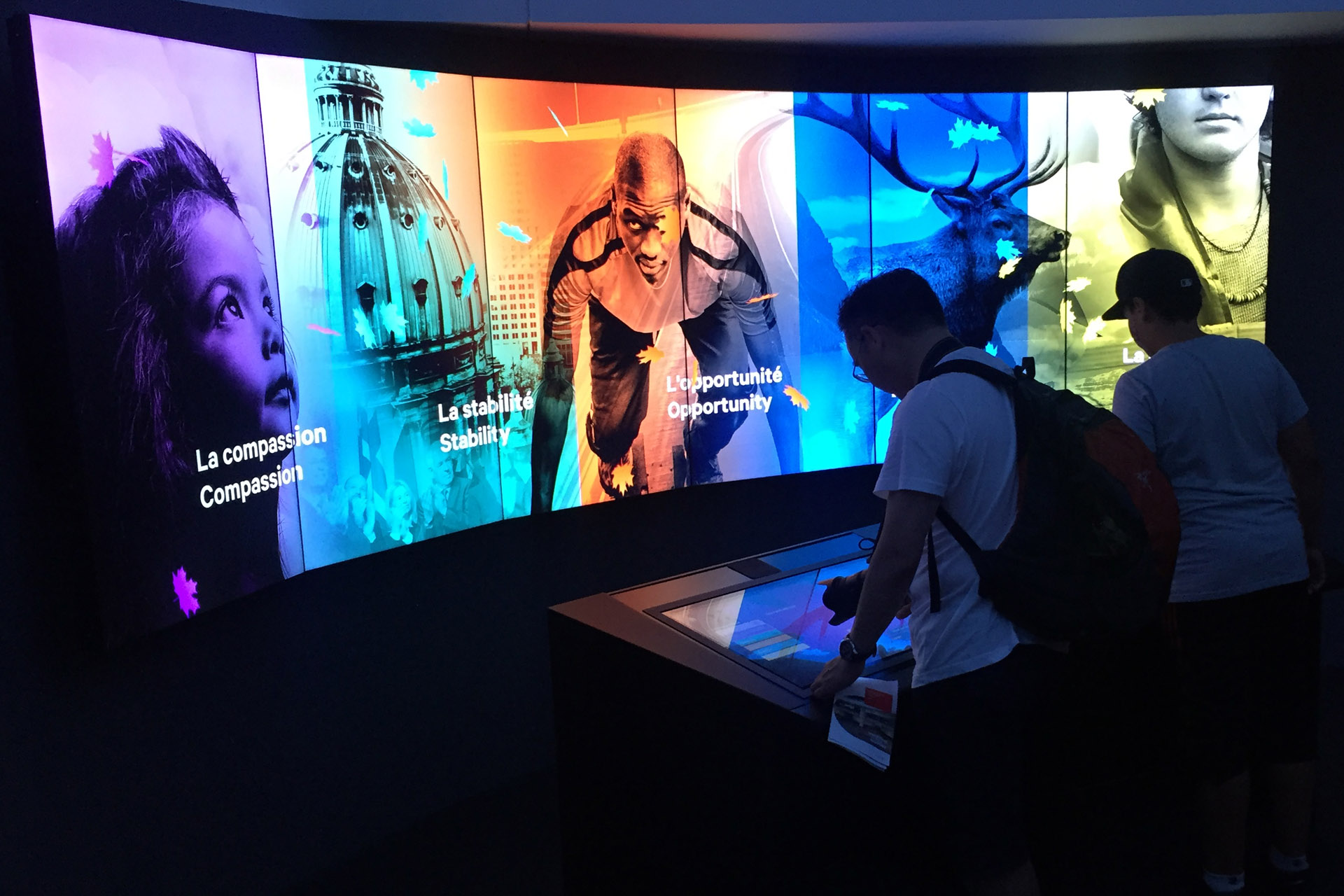
Conclusion Exhibit (Multi-Screen + Kiosk + Server)
A signature interactive installation combining:
- two touchscreen kiosks (message creation + sticker placement)
- a six-screen-wide HD display wall rendering a real-time animated visualization
- real-time generative animation system built in OpenFrameworks (C++) driving the large-scale display wall
- leaf-based message animation in 3D space
- a looping animated backdrop with Canada imagery and dynamic fact panels
- backend persistence via Node.js and SQLite for message and session state
Interactive Experience Delivered (ADA Companion iOS App – Swift)
A standalone accessibility application designed to extend the museum experience beyond the physical installation, providing alternative interaction pathways and content access for visitors with accessibility needs.
- native iOS application built in Swift
- App Store–distributed ADA companion for museum visitors
- alternative content access for exhibit materials (audio, text and contextual explanations)
- designed as a parallel experience layer to the physical kiosk system
- optimized for assistive navigation and simplified interaction flow
Key Engineering Challenges Solved
1. Replacing Flash with a Repeatable Kiosk Platform
This project occurred during the period when Flash was rapidly becoming obsolete. To avoid one-off kiosk development and reduce deployment risk, I built a standardized JavaScript kiosk framework that made interactive exhibit development repeatable.
This included:
- a reusable app bootstrap process
- standardized configuration and asset manifests
- modular file inclusion and dependency loading
- a consistent structure that other engineers could adopt
2. Building a Reusable Touch Interaction System
Museum kiosks require touch interactions that feel native, including inertia, scrolling physics, pinch zoom, and edge resistance. I implemented reusable components that supported:
- inertial scrolling with friction
- pinch-to-zoom for high-resolution artifacts/documents
- double-tap zoom behavior
- scroll indicators and fade masks
- scroll container modules usable across multiple kiosk types
3. Creating a Custom Typography + Multilingual Runtime
Many of the interactives required bilingual support and varied layout constraints. I built reusable multilingual infrastructure including:
- runtime language switching controller
- per-language font substitution
- RTL/LTR support
- adaptive text sizing and auto-fit logic (max width/height constraints)
4. Standardizing Exhibit Idle + Attract Behavior
Public-facing kiosks must recover cleanly after visitors walk away. I developed reusable idle logic that supported:
- idle timers
- “Still There?” overlays
- automatic attract loop return
- consistent behavior across all kiosks
5. Kiosk-to-Display Communication on BrightSign
Several stations required a touchscreen UI controlling a separate display playback system. I implemented UDP-based communication between BrightSign devices, allowing:
- kiosk selection → display playback control
- browser-based applications to exchange commands via BrightScript UDP messaging
- reuse of the same JavaScript framework on embedded hardware deployments
Outcome
The final installation delivered a large suite of stable, museum-ready interactive applications supporting one of Canada’s largest permanent museum exhibitions.
Key outcomes included:
Key outcomes included:
- delivery of 22 kiosk applications plus an ADA companion app
- standardized architecture that enabled rapid production and reliable deployment
- reusable JavaScript framework adopted internally for future projects
- long-term maintainability beyond the Flash era
Skills Demonstrated
- technical leadership on large-scale museum deployments
- kiosk framework / runtime development (JavaScript + Chromium kiosk mode)
- modular app architecture + configuration-driven systems
- custom UI abstraction layer (display object / Node wrapper model)
- ActionScript-style event dispatcher architecture
- touch interaction engineering (scroll inertia, pinch zoom, edge resistance)
- custom typography utilities (auto-fit, adaptive scaling, measurement)
- multilingual system design (runtime switching, font substitution, RTL/LTR)
- idle/timeout/attract loop infrastructure for unattended kiosks
- BrightSign browser deployments + BrightScript UDP messaging
- Node.js + SQLite persistence for interactive installations
- multi-screen openFrameworks exhibit development